
Selection Set Tool
The Selection Set inherits from the MicroStation Python DgnElementSetTool. Start with a selection set of objects, then run the script. While the tool is active you can …
- Click the Data button to select a new DGN element. The element is added to the selection set
- Click the Data button on a selected element to remove it from the selection set
- Click the Reset button to signal that the selection set is ready for processing
- The tool examines the selection set …
- Collects a list of snap points from the elements
- Creates a CurvePrimitive from the points
- Calculates the centroid of the
CurvePrimitive - Places a label (DGN text element) at the centroid
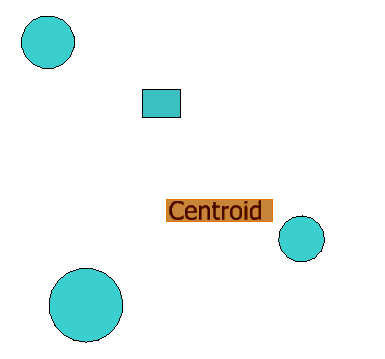 |
Calculate Centroid
The way to compute the centroid of a selection set is
described elsewhere.
This article focusses on using
DgnElementSetTool
to manage a selection set.
Selection Set Tool
Like other tools that demonstrate the MicroStation state machine, this tool
implements class ElementSelectionTool that inherits from
DgnElementSetTool …
class ElementSelectionTool(DgnElementSetTool):
    def __init__(self, toolId=1):
        DgnElementSetTool.__init__(self, toolId)
        self.m_self = self  # Keep self reference
        self.m_select_manager =  SelectionSetManager.GetManager()
Because we want this tool to be able to modify a selection set, we add this method …
def _AllowSelection(self):
    # Allow processing of existing selection sets
    return DgnElementSetTool.UsesSelection.eUSES_SS_Check
Value eUSES_SS_Check instructs the tool to check for a selection set when it starts.
If a selection set is active, it works with that selection set.
Otherwise, it behaves like an element pick tool.
Enumeration member DgnElementSetTool.UsesSelection.eUSES_SS_Check is
described here.
Element Selection and De-Selection
The tool lets a user add an element to the selection set,
or remove an element from the selection set.
The time to do that is in the _OnDataButton event …
def _OnDataButton(self, ev: DgnButtonEvent):
    # Handle data button: add or remove element from selection set
    path = self._DoLocate(ev, True, ComponentMode.eInnermost)
    if not path:
        return False

    eh = ElementHandle(path.GetHeadElem(), path.GetRoot())
    dgn_model_ref = ISessionMgr.ActiveDgnModelRef

    # Check if element is already selected
    already_selected = self.is_selected(eh)
    if already_selected:
        # Remove from selection set
        self.m_select_manager.InvertElement(eh.ElementRef, dgn_model_ref)
        msg = "Element removed from selection set"
    else:
        # Add to selection set
        self.m_select_manager.AddElement(eh.ElementRef, dgn_model_ref)
        msg = "Element added to selection set"
    NotificationManager.OutputPrompt(msg)
    print(msg)

    self._SetupAndPromptForNextAction()
    return True
Check Membership of Selection Set
Here's the test for membership of the selection set …
def is_selected(self, eh: ElementHandle)->bool:
    '''
    Test whether the given element is already part of the current selection set.
    '''
    already_selected = False
    for i in range(self.m_select_manager.NumSelected()):
        selected = ElementHandle()
        self.m_select_manager.GetElement(i, selected)
        if eh.ElementId == selected.ElementId:
            already_selected = True
            break
    return already_selected
Ready to Compute the Centroid
When user is finished editing the selection set,
press the Reset button to instruct the tool to
compute the centroid of the members of the set.
That magic is performed in the _OnResetButton event …
def _OnResetButton(self, ev: DgnButtonEvent):
    # Finish selection process, create centroid
    count = SelectionSetManager.GetManager().NumSelected()
    msg = f"Selection complete. {count} element(s) selected."
    NotificationManager.OutputPrompt(msg)
    print(msg)
    if 2 < count:
        # Calculate centroid
        calculator = CalculateCentroid()
        centroid: DPoint3d = calculator.centroid
        labeller = CreateTextElement(ISessionMgr.ActiveDgnModelRef)
        labeller.place_label(centroid, "Centroid")

    self._OnRestartTool()
    return True
Class CalculateCentroid
is described elsewhere.
LA Solutions Examples
You'll find Python examples written by LA Solutions on these pages, starting here.
Acknowledgements
I was struggling for a while to work out how to persuade DgnElementSetTool to work with a selection set.
There are no examples, in any programming language, of DgnElementSetTool.UsesSelection.
I was rescued by Bentley Systems staffer
Leonard Jones,
who posted a solution on
MicroStation Programming Forum.
Visit the LA Solutions' State Machine examples Download page.
Questions
Post questions about MicroStation programming to the MicroStation Programming Forum.
