
MicroStation Tools
Generic State Machine
DgnElementSetTool class
implements a
state machine.
Here's an example of a simple
state diagram
…
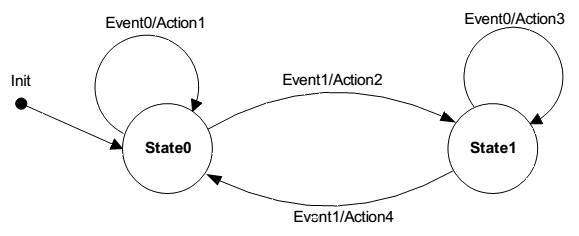
As the machine received events and actions, it moves from one state to another. In the above diagram, Event0/Action1 causes nothing to happen and the machine remains in State0. Event1/Action2 causes the machine to change from State0 to State1. Event1/Action4 causes the machine to change from State1 to State0.
MicroStation State Machine
Suppose you start a MicroStation Place Line tool …
- Initial state: When you start the tool, you see a prompt (e.g. Place Line)
- Datapoint state: Once you've placed the first point, the tool changes state: it prompts for another point (e.g. Place Next Point)
- Create state: After placing the required number of points, the tool changes state again: it's able to complete its task (e.g. Creates a DGN line element)
- Reset state: If the tool is finished, or perhaps you press Reset, the tool reverts to state 1
That's an example of a simple three-state machine.
It's implemented using the
DgnElementSetTool
class.
Other State Machines
MicroStation Python offers more specialised state machines that inherit from DgnElementSetTool.
Read about them here.
Inherit from DgnElementSetTool class
Write your own tool for MicroStation that emulates the idioms of the built-in tools.
Start by inheriting from DgnElementSetTool …
class ElementPicker(DgnElementSetTool):
You're creating a Python class, so initialise your tool with the __init__ method …
    def __init__(self, toolId: int):
        """
        Initialize the ElementPicker.

        param toolId: The ID of the tool.
        """
        DgnElementSetTool.__init__(self, toolId) # C++ base's __init__ must be called.
        self.m_isDynamics = False
        self.m_ev = None
        self.m_self = self # Keep self-referenced. This variable is used by the base class DgnElementSetTool.
DgnElementSetTool Notes
-
self.m_selfis assigned, but you won't see it used. I assume thatDgnElementSetTooluses it internally - Super-class
__init__is called explicitly:DgnElementSetTool.__init__(self, toolId) -
m_isDynamicsis a flag that indicates when you need to draw graphics in dynamics. For example, when you place a line-string or shape and want to 'rubber-band' a preview of the object -
m_evis aDgnButtonEventthat your code may receive at certain stages (e.g. user placed a datapoint)
Message Lists
"What is toolId?" I hear you ask.
In Python it's an
enigma.
Most of MicroStation Python is derived from the C++ MicroStationAPI.
That API and its predecessor MDL use message lists to store translatable message resources.
A message list is identified by an integer ID, and each message in that list also has an integer ID.
Using C++, there are functions that provide access to messages using those IDs.
Unfortunately, Python has no way of building a message list, nor does it have access to existing message resources.
toolId is an unused and unusable relic of MicroStation Python's journey from the MicroStationAPI.
toolId does nothing: you can't use it.
DgnElementSetTool Summary
I've extracted a
summary of DgnElementSetTool event handlers.
Look at the
Python examples
to see how those handlers are used.
Python Examples
MicroStation Python Examples
There are Python examples that use
DgnElementSetTool
delivered with your MicroStation installation.
You'll
find those examples
in your computer's local drive.
They are likely to be found in this folder …
C:\ProgramData\Bentley\PowerPlatformPython\Examples\Microstation\DgnElements\
LA Solutions Examples
You'll find Python examples written by LA Solutions on these pages, starting here.
Visit the LA Solutions' State Machine examples Download page.
Questions
Post questions about MicroStation programming to the MicroStation Programming Forum.
