
Smart Area Labeller
The area labeller described here demonstrates how to pick a shape element,
then compose a
TextBlock.
The TextBlock includes a
TextField
that displays the area of the chosen element.
A single
TextField
can display the shape's area or perimeter …
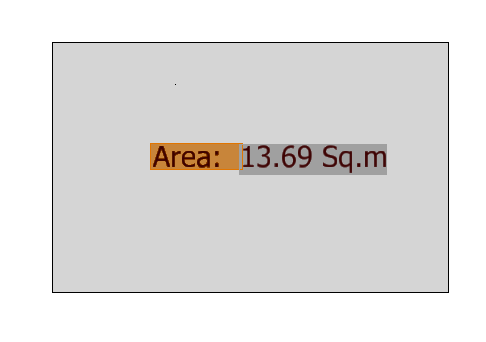
If you want to display both the shape's area and perimeter you need to create two TextFields,
one for the area and the other for the perimeter.
TextField Background
By default, MicroStation doesn't apply the text style background of the text element to the text field. You can modify that behaviour by applying the appropriate MicroStation user preference. Read more about Use Text Style Background Color for Field Background.
Association
The label is a DGN text or text node element. It is stand-alone text that is associated with the picked shape. If you move the shape, the text moves automatically. If you edit the shape and change its size, the text label updates automatically to reflect the new area.
That association is set up by the TextAssociationHandler.
Dependency
The TextField has a dependency on the host shape element.
That is, the TextField is dependent on that shape.
That's how the label knows to update if the host element is changed.
Use the ANALYZE ELEMENT tool to see those dependency data on the label text node.
Introduction to the TextField Class
TextField Documentation
| Source | Link |
|---|---|
| MicroStation Help | Fields - Derived Content in Text |
| MicroStation Python API Help | TextField class |
The class connects to a DGN element, model or file …
-
TextField.CreateForElement() -
TextField.CreateForModel() -
TextField.CreateForFile()
In this example we're working with a DGN shape element.
EC Classes
EC data are linked to a DGN object by that object's Element ID. An Element ID is a 64-bit integer. It is unique within the context of a DGN file. MicroStation provides formatter classes that link to an element by its Element ID. A formatter understands the context of a DGN element: whether it's 2D or 3D; whether it's open or closed (i.e. a line vs. a shape); how it should be measured.
Using the TextField Class
We need code that makes an EC formatter from the EC data belonging to an element.
We'll assign that formatter to the TextField.
The TextField that we create needs to know about its target DGN element.
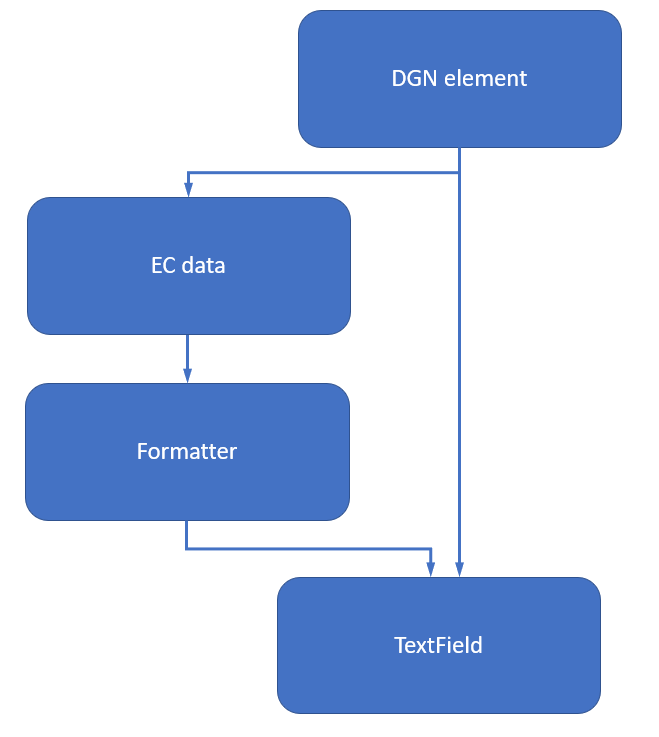
The smart label tool example is implemented in cmdPickClosedElement, a shape picker class that inherits from
DgnElementSetTool.
There are several examples that show how to use DgnElementSetTool and I won't discuss it further here.
What I will discuss is how to connect the picked element with its corresponding TextField.
cmdPickClosedElement._OnElementModify
The magic starts in method cmdPickClosedElement._OnElementModify,
where we instantiate a AreaLabelHandler class …
def _OnElementModify(self, eh: ElementHandle)->int:

   … several lines omitted

  # Here's where we start working with EC schemas.
  # Use the shape centroid as the origin of the text label.
  # WireCentroid returns (bool, float, DPoint3d)
  status, length, centroid = curve.WireCentroid ()
  if status:
    # Use the centroid as the origin of the text label
    labeller = AreaLabelHandler(eh)
    status, label = labeller.CreateLabel(centroid)
    if status:
      status = label.AddToModel()

  # Return ERROR to signify no change.
  return BentleyStatus.eERROR
Class AreaLabelHandler
from EC.EC_Helpers.label_handler import (AreaLabelHandler, )
Class AreaLabelHandler manages the interaction with MicroStation's EC schemas.
The class constructor gets the formatter class …
status, self._formatter = self.GetFormatterInstance("AreaClass")
AreaLabelHandler.CreateAreaTextField
CreateAreaTextField calls the base class CreateTextField,
supplying the appropriate class and property names …
def CreateAreaTextField(self)->TextField:
    return self.CreateTextField ("MstnClosedBoundary", "EnclosedArea")
AreaLabelHandler.SetAreaProperties
Sets the formatter instance properties to display an area measurement …
def SetAreaProperties(self)->bool:
  print(f"SetAreaProperties unit={self._units} accuracy={self._accuracy} decorator={self._decorator} prefix='{self._prefix}'")
  self.SetInstanceProperty ("MasterUnits", self._units)
  self.SetInstanceProperty ("Accuracy", self._accuracy)
  self.SetInstanceProperty ("UnitDecorator", self._decorator)
  if self._prefix:
    self.SetInstanceProperty ("PX", self._prefix)
  if AreaDecoratorOptions.SquareUnit != self._decorator and AreaDecoratorOptions.Unit2 != self._decorator:
    self.SetInstanceProperty ("SX", str(Format.UnitsArea (self._units).c_str ()))
    self.SetInstanceProperty ("ShowLabel", 0)
  return True
AreaLabelHandler.CreateLabel
AreaLabelHandler supplies method CreateLabel,
tailored to describing a DGN shape element.
It calls CreateAreaTextField() to create a TextField,
which is appends to our TextBlock.
Finally, it uses the TextBlock to create a DGN element …
def CreateLabel(self, origin: DPoint3d)->[bool, EditElementHandle]:
  '''
  Compose a TextBlock and convert to a text element at the given origin.
  The TextBlock will contain at least a TextField that displays the
  appropriate measurement (e.g. Area or Perimeter).
  The TextBlock may additionally contain a prefix, suffix and units depending on the chosen
  options.
  The constructor already initialised these class members...
    self._text_block
  '''
  self._text_block.SetUserOrigin(origin)
  status = self.SetAreaProperties()
  if status:
    text_field = self.CreateAreaTextField()
    assert text_field is not None, "CreateLabel: unable to create area TextField"
    self._text_block.AppendField (text_field)
    label = EditElementHandle()
    status = TextHandlerBase.CreateElement(label, None, self._text_block)
    return status, label
  return False, None
Examples
The examples page lists example projects written by LA Solutions.
Questions
Post questions about MicroStation Python programming to the MicroStation Programming Forum.
