
MicroStation Engineering Content: EC Formatters
As a programmer, you know that DGN elements are stored in a DGN model, and that a DGN model
has a Units property.
Units specifies the master units, sub-units and working units used in that DGN model.
Different models may have different Units.
Master Units are typically a human-scale dimension, such as metres or feet.
DGN elements are created and drawn in the context of their DGN model. The units used are always the DGN model's unit of resolution (UORs). UORs may be several orders of magnitude different to master units.
Legacy Line Measurement
When presenting DGN element data to a user, we need to convert from UORs to master units. It's common to see legacy code like this when presenting the length of a line …
model_info = dgnModel.GetModelInfo()
scale_factor = model_info.UorPerMeter
line_length = curve.Length()/scale_factor
print(f"line {line_length}m")
scale_factor is the conversion from UORs to metres in the DGN model.
The line length, measured in UORs, is divided by the scale_factor for human consumption.
A drawback of that kind of scaling is that it is inflexible. You must write a format function for length, area, volume and other measurements. The conversion is static: it works only when your code is running. The scaling doesn't work if a MicroStation user modifies an element when your code is unable to calculate a new measurement.
MstnPropertyFormatter
Formatting Classes
Using the ECClasses and ECProperties provided by the MstnPropertyFormatter
you can move to a better way of formatting DGN measurements.
For example, the label below, created by LA Solutions' AreaAnnotator, shows an element's area
formatted in both square metres and square feet …
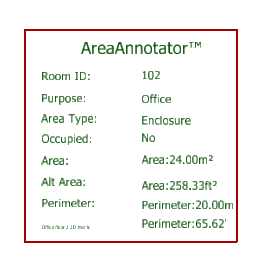
Each DGN element type has a corresponding formatter in MstnPropertyFormatter.
Rather than the above hand-crafted formatting, we create a formatting class in our code that uses the
ECClasses and ECProperties.
We no longer have to write an arithmetic conversion.
Now we can instantiate a formatter class,
and set its properties to suit our display requirements.
Then tell it the DGN element to work with.
Finally, plug the result into the user interface.
Use a formatter to produce the result of a measurement, then create a
TextField
to display those data.
The TextField knows that it's connected to an element, and if you modify that
element then the TextField updates automatically to show the new data.
Persistence
A key proporty of a formatter is that, once written to file, it is persistent.
That is, the format information is part of the TextField DGN element.
When the host element is modified, MicroStation examines the formatting code in that TextField and uses it to
format and display the new measurement.
Specialised Formatting Classes
There are various formatting classes to suit different types of element. For example, distance formatter, area formatter and volume formatter.
Here are the guts of a distance formatter …
def CreateDistanceFormatter(format_instance: IECInstance, n_units: int, n_accurary: int)->bool:
    helper = SchemaFormatHelper()
    helper.GetStandaloneInstance ("DistanceClass")
    helper.SetLengthProperties (n_units, n_accurary)
    return helper.Assign (format_instance)
- DistanceClass is the name of a class provided by the
MstnPropertyFormatter -
n_unitsselects on of several units (e.g. metres, inches, etc) to display -
n_accuraryspecifies the number of digits (e.g. 1.2, 1.23, 1.234, etc) after the decimal separator to display
Questions
Post questions about MicroStation programming to the MicroStation Programming Forum.
