
Find Grouped Holes in a DGN Model
Q How do I find grouped hole element using MicroStation Python?
Python Implementation
A Here's a Python function that looks for grouped holes in a DGN model …
def find_grouped_holes(dgn_model_ref: DgnModelRef = ISessionMgr.ActiveDgnModelRef)->[int, dict]:
    """
    Create a dictionary of Grouped Holes found in a DGN model.

    Returns: tuple(Count of grouped holes, dictionary of GroupedHoleData) indexed by group hole Element ID.
    """
    count = 0
    dgn_model = dgn_model_ref.GetDgnModel()
    graphical_elements: PersistentElementRefList = dgn_model.GetGraphicElements()
    #  Make a dictionary of grouped hole elements indexed by Element ID
    elements = [ElementHandle(per_element_ref) for per_element_ref in graphical_elements]
    grouped_holes = {} # Initialise empty dictionary
    for eh in elements:
        if GroupedHoleHandler.IsGroupedHole(eh):
            grouped_holes[eh.GetElementId()] = eh
            count += 1
    return (count, grouped_holes)
Grouped Hole Structure
A grouped hole element stores a chain of closed elements. The first element is always a non-graphical complex header. Graphic elements are nested beneath that header. The outer shape and its associated inner shapes (holes) closed regions: DGN shape elements, ellipse elements, and/or complex shape elements that are in the same plane. Holes are not patterned and appear "transparent" in rendered views.
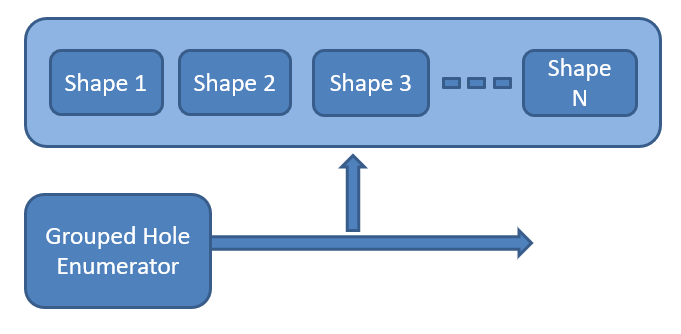
MicroStation Python provides the
ChildElemIter
class to navigate that structure.
ChildElemIter is tricky to use.
It's not properly documented (at least in the first release of MicroStation Python) and is not
Pythonic.
The documentation fails to mention a vital precursor to using ChildElemIter:
the values of related class ExposeChildrenReason.
Without a valid ExposeChildrenReason, ChildElemIter doesn't work.
Here's how …
ExposeChildrenCount = ExposeChildrenReason(100)
ExposeChildrenQuery = ExposeChildrenReason(200)
ExposeChildrenEdit  = ExposeChildrenReason(300)

eh = ElementHandle()
# Get ElementHandle from somewhere
component = ChildElemIter(eh, ExposeChildrenCount)
while component.IsValid():
    n += 1
    description = getElementDescription(component)
    MessageCenter.ShowDebugMessage(f"[{n}] Found component {description}", f"[{n}] Found component {description}", False)
    component = component.ToNext()
Function getElementDescription() is provided in the code example you can download.
The Python source code to enumerate a complex element is available for download.
Nested Cells
Complex elements, including cell elements, may be nested. That is, a complex element can include other complex elements. A cell element can include other cell elements.
Although a grouped hole is a cell element, it is not nested. A grouped hole consists of …
- An outer element, confusingly termed a solid by Bentley Systems
- One or more inner elements, termed holes by Bentley Systems
Moreover, a grouped hole is planar. It is a 2D construct.
Grouped Hole Levels
Like any cell or complex element, a grouped hole does not itself have a DGN level. It is not a graphic element, so ''level' is meaningless when contemplating a grouped hole.
A grouped hole contains at least one and probably two or more shape elements. Those shapes are graphic DGN elements and each has a DGN level. The shapes need not be on the same level: each shape may have a distinct DGN level.
Sometimes we see a question on the MicroStation Forum similar to "How can I find grouped holes on level X?" That question has no specific answer, because a grouped hole does not occupy level X, unless a user has explicitly created that grouped hole from a number of shapes, all on level X.
To help programmers get levels from a grouped hole, the grouped hole classes have their own page.
Grouped Hole Example
You can download an example Python project. The project shows how to …
- Get a dictionary of data about grouped holes found in a DGN model
- Measure the area and perimeter of each component of a grouped hole
- Format the measurements for human consumption
- See the level of each shape in a grouped hole
The resulting of printing each grouped hole, in my setup, looks like this …
Found 2 grouped holes
[1] GroupedHoleData N shapes=2 net area=2.81m2
   [1] Solid [600] Perimeter 6.89m Area 2.93m2 level 'Areas type 2'
   [2] Hole [601] Perimeter 1.25m Area 0.12m2 level 'Areas type 3'
[2] GroupedHoleData N shapes=3 net area=4.77m2
   [1] Solid [616] Perimeter 8.18m Area 5.32m2 level 'Areas type 5'
   [2] Hole [617] Perimeter 2.14m Area 0.29m2 level 'Areas type 5'
   [3] Hole [618] Perimeter 2.08m Area 0.26m2 level 'Areas type 6'
Your results will differ!
Grouped Hole Classes
I developed the grouped holes classes to extract data from a grouped hole element. They provide an API that is easy to use and reveals the essential data of a grouped hole …
- Class
GroupedHoleDatais the top-level. It holds a Python dictionary ofAreaDatainstances - Class
AreaDataholds information about each shape in a grouped hole.
Formatting Measurements
Python, like the C++ MicroStationAPi and C# MicroStationNET, measures using MicroStation units-of-resolution (UORs). UORs are not human-friendly because they tend to be large numbers, several orders of magnitude bigger than measurements you might expect in feet, metres, square feet or metres². The Python API supplies formatters that convert UORs into human-friendly numbers
You can read more about the formatters.
The grouped holes example provides distance_formatter and area_formatter classes.
They handle the shape perimeter and area values into something more reasonable than UORs.
Acknowledgements
Thanks go to MicroStation Programming Forum regulars …
They each provided help or suggestions that made my Python life easier.
Download Grouped Hole Example

Unpack the ZIP file and copy the Python file into a folder that MicroStation knows about. You should see a folder structure like this …
├── la_solutions_find_grouped_holes.py
├── GroupedHoles
│   ├── common.py
│   ├── formatters.py
│   ├── GroupedHoleClasses.py
│   ├── levels.py
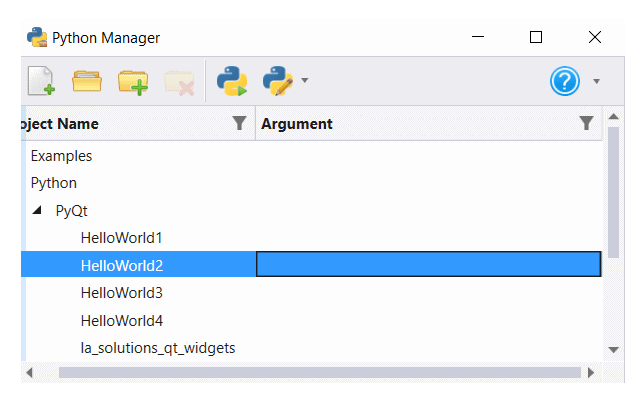
Use MicroStation's Python Manager to find and execute the la_solutions_xxx.py script.
Questions
Post questions about MicroStation programming to the MicroStation Programming Forum.
